

Enabling sales teams, distributors, or individual locations to personalize their own marketing materials can improve responsiveness. But this kind of autonomy requires a clear framework.
Without clear rules, outdated or incorrect versions may continue to circulate, materials can drift away from brand guidelines, and teams may end up with a tool that is too complex to be genuinely useful.
The goal is therefore not simply to provide access to a platform. A clear framework must be established so that every user knows what they can do, can quickly find the right resources, and has access to a workflow tailored to their needs.
Here are the key steps to implementing this structured approach to autonomy.
1. Start by reviewing requests from field teams
Before choosing a tool or designing a platform, it is essential to understand how teams currently work.
What requests are most frequently sent to the marketing team? Which materials need to be updated regularly? What information varies from one location or sales representative to another? At which stages do delays tend to occur?
This analysis can be based on real-world situations:
- adapting a poster for a local campaign;
- updating a price or date;
- adding a store’s contact details;
- personalizing a sales document;
- creating a menu or price list;
- ordering additional copies;
- finding the latest version of a marketing material.
It is also useful to speak directly with the future users. A sales representative, a regional manager, and a marketing team do not face the same challenges or require the same features.
Autonomy should be built around real-world needs and practices rather than a theoretical way of working.

2. Identify which materials should be customizable
Not all materials need to be immediately included in a customization workflow.
It is best to start with materials that share several key characteristics:
- they are frequently requested;
- their visual layout changes very little;
- only a few pieces of information need to be customized;
- producing them regularly requires input from the marketing team;
- they address a specific, recurring need from field teams.
For example, these may include:promotional posters, flyers, menus, price lists, sales sheets, customized catalogs, or point-of-sale (POS) materials.
This prioritization makes it possible to launch the project with a clear and useful scope. The initial results can then help identify which additional templates should be added.
3. Bring all resources together in one central location
To work independently, users must first be able to easily find the right materials.
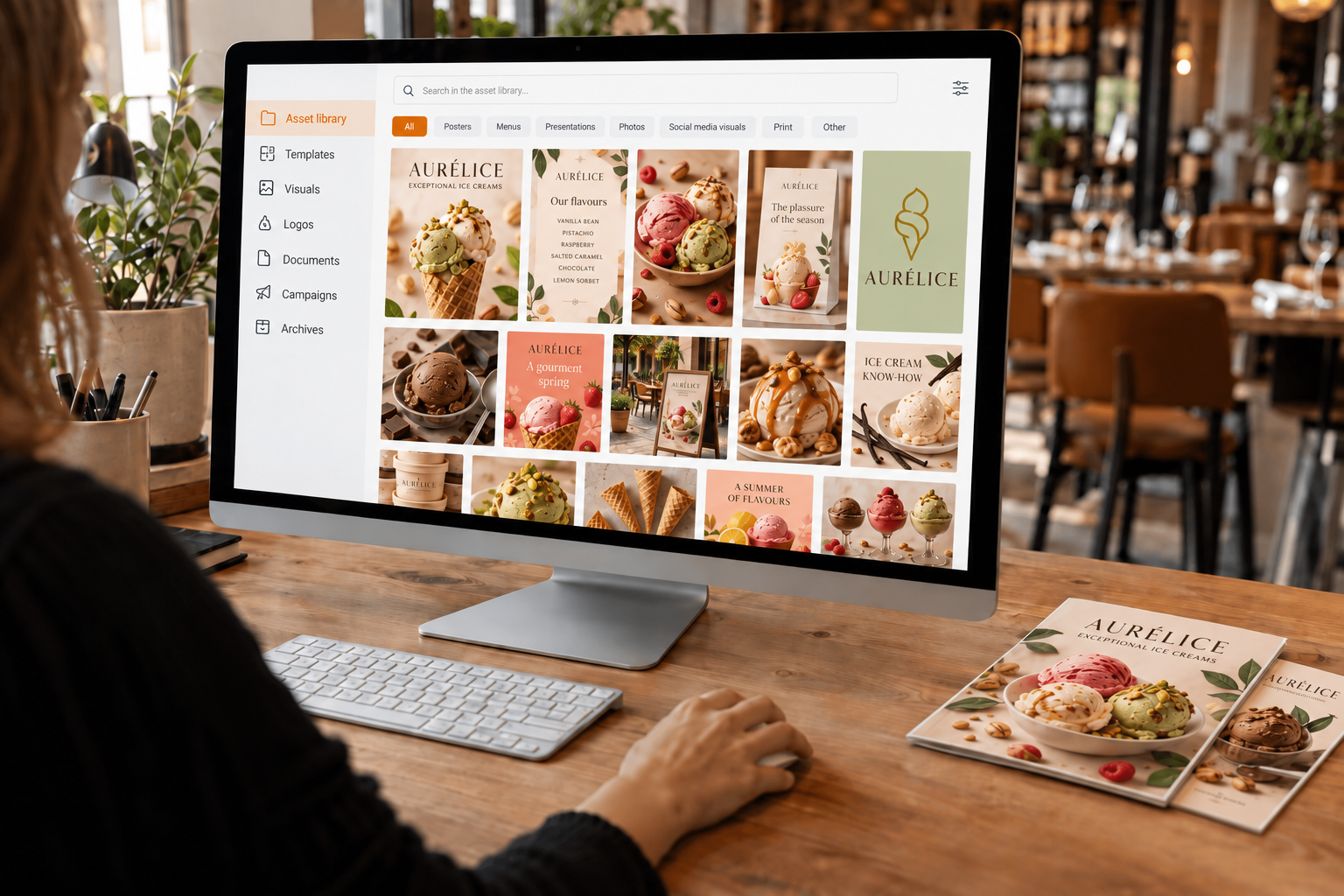
A centralized library makes it possible to bring together in one place:
- available templates;
- approved visuals;
- logos;
- sales documents;
- current campaigns;
- versions tailored to different brands or regions;
- older materials that may have been archived.
Centralization is not simply about moving all files to a new location. Content should be organized in a way that makes sense to users: by type of material, campaign, brand, sector, location, or use case.
The France Num 2025 Barometer reports that 81% of French micro, small, and medium-sized businesses use collaborative tools, including instant messaging and online document-sharing platforms. However, having a shared space does not guarantee that resources are up to date, properly organized, or ready to use.
The challenge is therefore not simply to store files, but to make them genuinely... accessible and actionable.
4. Design pre-approved templates
Once the priority materials have been identified, they should be turned into customizable templates.
Each template is designed from the outset to incorporate:
- brand guidelines;
- the dimensions of the material;
- fixed elements;
- editable information;
- readability requirements;
- the mandatory legal information;
- mandatory information;
print production specifications.
This approach ensures a consistent presentation, regardless of how many sales representatives, locations, or distributors are customizing the document.
5. Define what can be customized
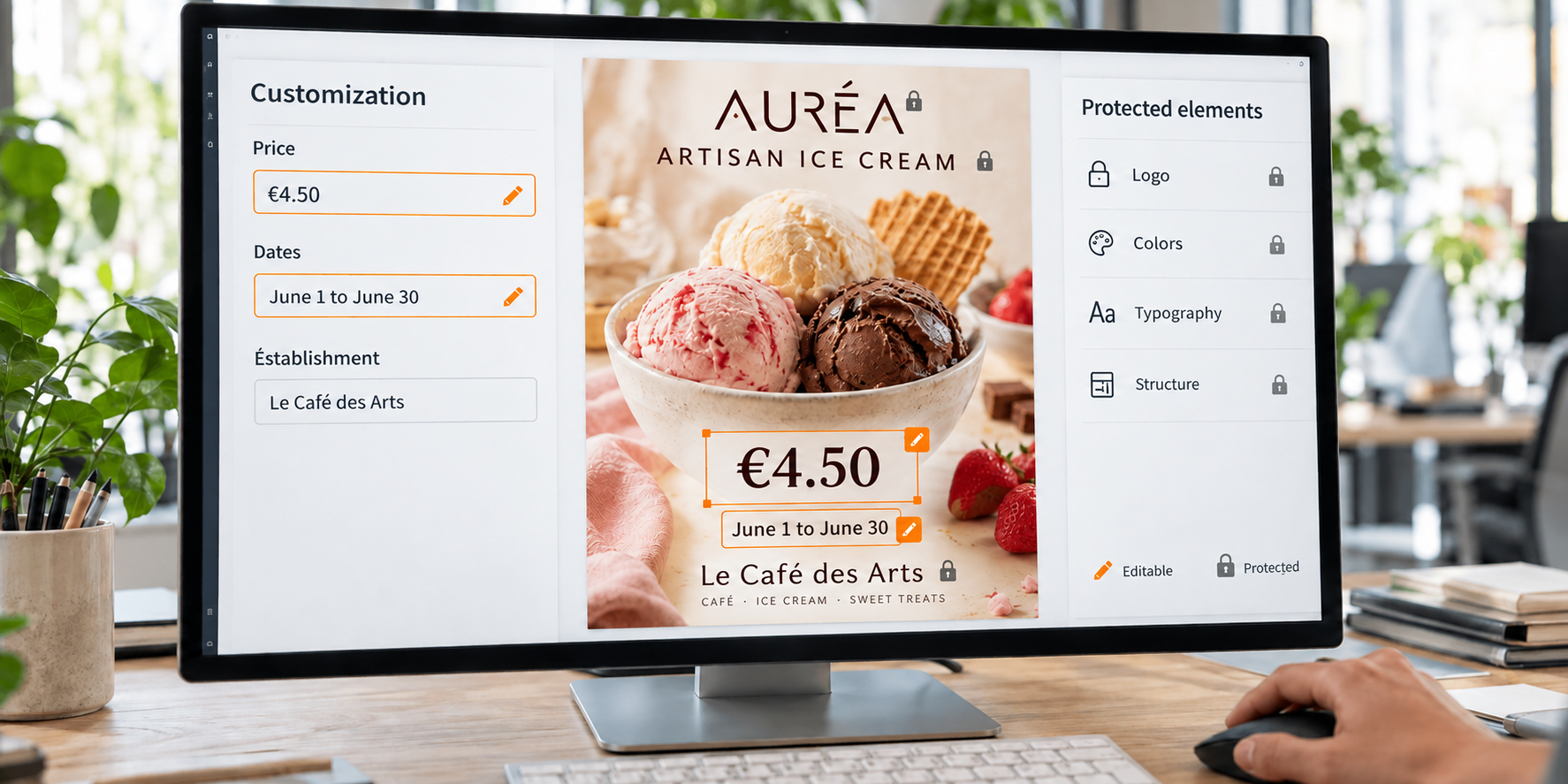
Structured autonomy is based on a clear distinction between editable elements and those that must remain protected.
Customizable areas may, for example, include:
- contact details;
- campaign dates;
- prices;
- opening hours;
- the name of a location;
- certain short texts;
- a photograph selected from a range of pre-approved options;
- - a selection of products.
Conversely, the logo, colors, fonts, overall layout, and regulatory information can be locked to prevent changes.
The more clearly the customization rules are defined, the simpler the experience is for users. They immediately know which information they can edit without worrying about compromising the material.
6. Assign permissions based on user roles
Not all users need access to the same documents or need to perform the same actions.
An organization may, for example, define several user roles:
- the central marketing team creates templates and manages content;
- the regional manager accesses materials for their area and approves certain requests;
- the sales representative customizes information related to their customers;
- the individual location updates its contact details, prices, or opening hours;
- etc.
This permission management system makes it possible to create workflows tailored to each user’s responsibilities. It also prevents users from being overwhelmed with content or features that are not relevant to them.
The goal is to ensure that each person has direct access to the resources they need.
7. Adapt the approval workflow to the level of risk
Autonomy does not necessarily mean eliminating all approval processes.
Certain changes can be allowed without any additional approval. This is particularly the case when users can only edit tightly controlled fields, such as an address or a date.
Other changes may require approval:
- editing sales copy;
- selecting a specific visual;
- changing an offer;
- adding sensitive information;
- using a non-standard marketing material.
The workflow should therefore be proportionate to the level of risk. If every request still requires manual approval, autonomy will remain limited. However, if no controls are in place for sensitive changes, brand consistency and control may be compromised.
An effective organization distinguishes between routine changes that can be automated and specific requests that require human review.

8. Extend the workflow through to ordering
Customizing a marketing material is often only the first step. It then needs to be reviewed, ordered, produced, and delivered.
When customization and production are managed separately, users may have to download their file, contact a service provider, resubmit their information, and wait for another approval.
An integrated workflow can simplify this sequence of steps:
- the user selects the marketing material;
- they enter the permitted information;
- they preview the result;
- the document is approved according to the predefined rules;
- they select the desired quantity;
- they enter the delivery address;
- the order is sent to production;
- they can track its progress.
This continuity eliminates duplicate data entry and reduces the risk of errors between the customized document and the final printed material.
9. Prepare your teams for adoption
The success of the project does not depend solely on its features. It also depends on how seamlessly it integrates into users’ daily workflows.
Even a highly comprehensive tool may see limited adoption if it is difficult to understand or if teams do not immediately see its value.
To encourage adoption, it is recommended to:
- involve field users in the design process;
- test workflows before deployment;
- keep the number of steps to a minimum;
- use familiar terminology;
- provide short demonstrations;
- make simple guides available;
- appoint a dedicated point of contact;
- - gather feedback after launch.
This simplicity is all the more important because companies have limited time to train their teams. According to the France Num 2025 Barometer, based on a survey of 11,021 micro, small, and medium-sized businesses, 55% of respondents identified lack of time as the main barrier to digital training.
The platform should therefore be intuitive enough to deliver value to users quickly.
10. Track usage to continuously improve the system
Structured autonomy is not a static way of working.
Needs evolve alongside campaigns, teams, brands, and marketing materials. It is therefore useful to monitor:
- the number of active users;
- the most frequently viewed templates;
- the most frequently customized marketing materials;
- the number of orders placed;
- requests that continue to be sent to the marketing team;
- stages where users drop off;
- - new needs identified by field teams.
This information can be used to improve workflows, add new templates, or simplify certain steps.
Measurement should not focus solely on the number of accounts created. The key is to determine whether teams are actually using the system and whether it is reducing the friction they previously experienced.

Building a framework that truly enables action
Implementing structured autonomy is not simply about giving teams access to files or a content creation tool.
A consistent framework must be established in which:
- the right marketing materials are easy to find;
- customization rules are built into the templates;
- each user has the appropriate permissions;
- approvals are required only when necessary;
- ordering and production are integrated into a seamless workflow;
- usage is monitored to continuously improve the solution.
Head office therefore retains control over the brand, while field teams can act more quickly and with greater confidence.
At IPOCAM, we design custom custom web-to-print platforms based on each organization’s specific processes, users, and constraints. Our approach brings together centralized marketing materials, customization, permission management, and production to make communication truly actionable for field teams.